
Windows Terminal profile for Claude with no permission prompts
Published:
Every time I open Claude Code in a new directory I get a workspace trust prompt asking me to approve permissions. It makes sense as a safety guardrail, but in directories I own and trust it’s just friction. I made a dedicated Windows Terminal profile that launches Claude with --permission-mode bypassPermissions so it skips straight to work.
Here’s the gist: Windows Terminal profile for Claude.
Here’s what it looks like:
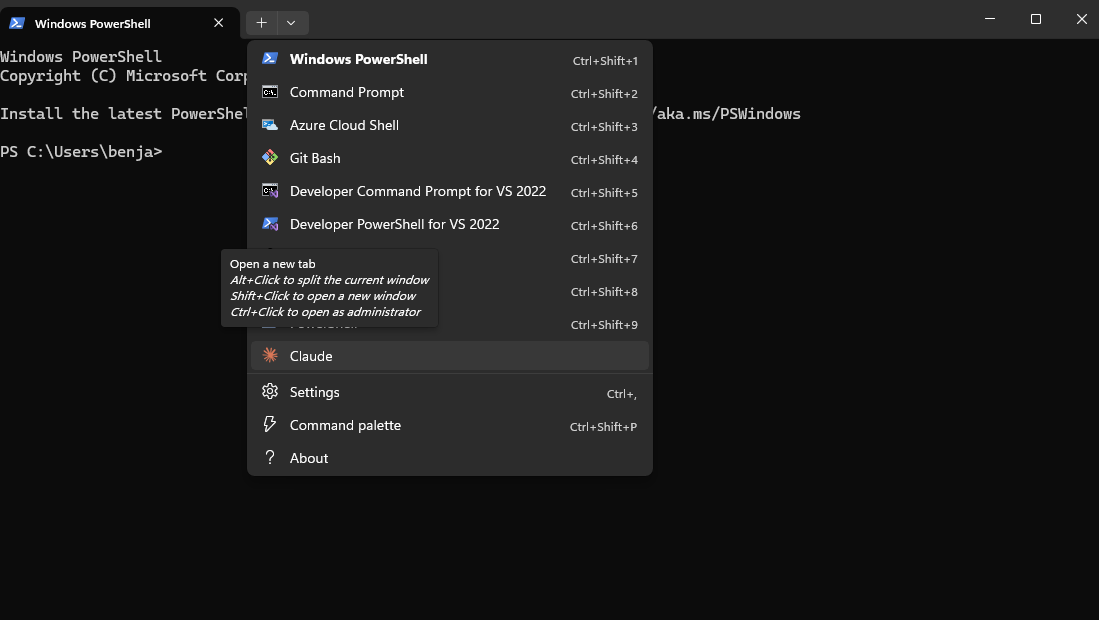
You can install it with a PowerShell one-liner:
irm 'https://gist.githubusercontent.com/bstee615/9b43dd9e40f91f0f082f5697968f04b3/raw/setup.ps1' | iex
Or add this manually to profiles.list in your Windows Terminal settings.json (Ctrl+, → Open JSON file):
{
    "commandline": "cmd.exe /c claude --permission-mode bypassPermissions",
    "guid": "{a1b2c3d4-e5f6-7890-abcd-ef1234567890}",
    "hidden": false,
    "name": "Claude",
    "startingDirectory": "%USERPROFILE%"
}
The setup script checks for an existing profile by GUID before inserting, so running it twice is safe. One caveat: only use this flag in directories you own or fully trust — it disables all permission checks.